


Moving into a new office is always an exciting milestone. It brings fresh energy, new setups, and — inevitably — the age-old workplace challenge: meeting room management.
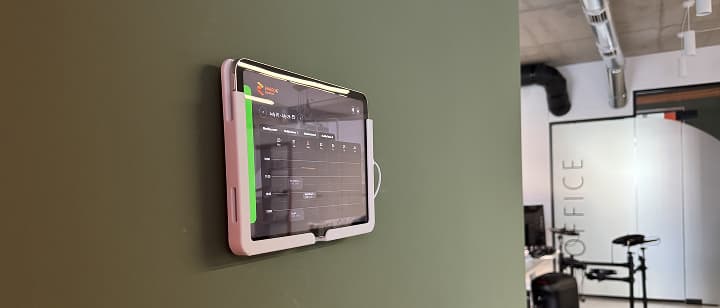
When our team made the move, we immediately realized we needed a seamless way to display room statuses right outside the doors, fully integrated with our corporate Google Workspace calendars. We started looking at existing off-the-shelf market solutions, but something felt missing. They were either clunky, rigid, or didn't fit our brand aesthetic.
The hardware options on the market were equally disappointing: commercial mounts were bulky, overpriced, cluttered our doors with visible wiring, and completely clashed with our office design.
We are an IT company. Why not build our own modern, customized, and branded software and hardware solution?
Defining the Essential Feature Set
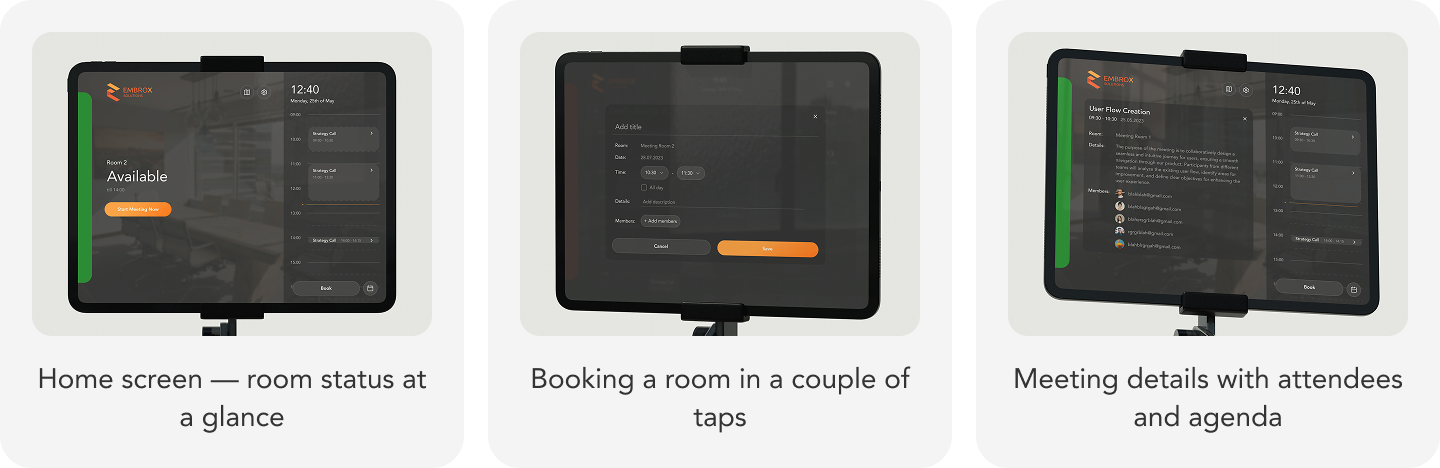
- Real-time availability & schedule view: Clear visual cues (red/green) so anyone walking down the hall can instantly see if a room is occupied or free.
- Resource-intensive process: The ability to walk up to an available room tablet and reserve it immediately with a single tap.
- Slow decision-making: The ability to check room availability across the entire office directly from any tablet, saving unnecessary walks.
- Participant & detail insight: Viewing attendee lists and agenda items (with built-in privacy controls when sensitive details are involved).
Under the Hood: Deep Integration with Google Workspace
To ensure our custom solution integrated naturally into our daily routine, it had to rely on our single source of truth: Google Calendar.
Rather than managing a custom database for room schedules, we leveraged Google Workspace Organization-level Resource Calendars. We set up a dedicated service account with domain-wide delegation and extended permissions. This allowed our system to dynamically discover and fetch all organization-level room resources, synchronizing availability seamlessly without manual calendar configurations for individual devices.

Hardware Integration: Parametric CAD & In-Office 3D Printing
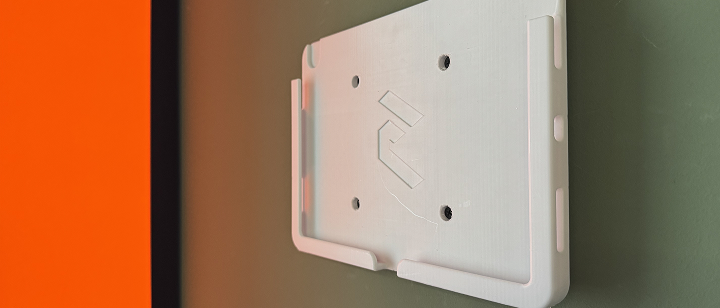
- Custom Geometry & Cable Management: We brought an open-source parametric CAD model modified the geometry with a 0.2mm offset clearance for a scratch-free fit. We added a recessed internal channel to completely conceal a right-angle Lightning/USB-C power cable flush against the wall.
- Branding: We debossed our company logo directly onto the front bezel at a 45-degree angle to maintain structural strength and eliminate the need for temporary support material during printing.
- Material & Slicer Settings: Using our in-office 3D printer, we printed the mounts in matte white PETG filament for higher durability and UV resistance near office lighting and windows.
Overcoming Engineering & UX Challenges
1. Persistent Authentication & Token Expiry
- The Problem: Standard OAuth tokens expire, and having a wall-mounted tablet unexpectedly logout or prompt for credentials degrades the user experience.
- The Solution: We implemented a resilient backend token-refresh strategy coupled with a smart polling mechanism. The app continuously manages token lifecycles silently in the background, recovering gracefully even after network drops or internet interruptions.
2. Lock-Down & Kiosk Mode
- The Problem: Because these tablets live in public office areas, we needed to prevent users or guests from exiting the app or tampering with OS settings.
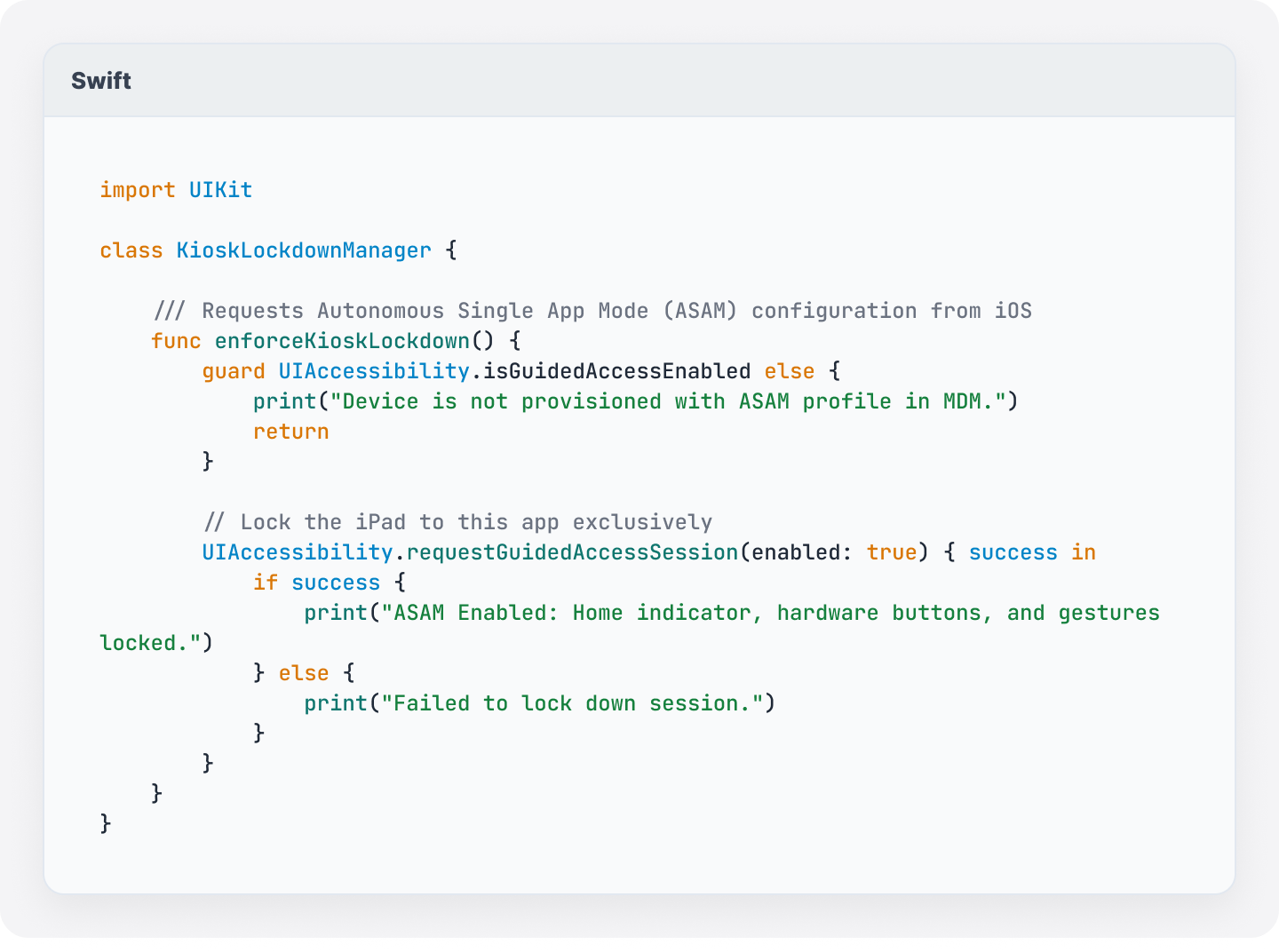
- The Solution: We deployed Autonomous Single App Mode (ASAM) / Guided Access across our iOS tablet fleet. We programmed the app to enforce session lockdown at runtime.
3. Display Longevity & Nighttime Saver
- The Problem: Running tablet screens at full brightness 24/7 drains unnecessary power, generates excess heat, and risks screen burn-in.
- The Solution: We engineered an automated night-mode power saver. During off-hours, the app transitions into a pitch-black background state, throttles network polling, and programmatically reduces screen brightness down to near-zero, extending hardware longevity while cutting idle energy consumption.
The Broader Impact: Culture & Team Ownership
Beyond solving our internal scheduling issues, this project proved to be a valuable internal experience.
It brought developers, UI/UX designers, and project managers together to collaborate on a full-stack product—from CAD modeling the plastic holding the device to the Swift threads running inside it. Everyone contributed ideas: discussing optimal button placement on small displays, fine-tuning color contrast for hallway visibility, and testing 3D print prototypes.
What’s Next?
Building our internal meeting room app allowed us to test ideas, refine our tablet-first development workflows, and practice dogfooding our own software and hardware integration solutions.

